Cornell Note-Taking System: Notes, Cues, and Summary
The Cornell Note-Taking System helps you split a page into a notes area, a cue column, and a summary, then review by covering the notes and testing from the cues. Walter Pauk designed it so a page can be quizzed, not only reread. The lines on the page do not, by themselves, produce recall.
Framework Card
- Name:
- Cornell Note-Taking System
- Goal:
- Split a page into notes, cues, and a summary, then review by covering the notes and testing from the cues.
- Flow:
- Capture in the notes area → Add cues after the session → Write the summary → Review by testing from cues
- Best For:
- Lectures that become unread transcripts; Meeting notes that cannot be self-tested later; Readings that need a page you can quiz, not reread
Why it matters
A lecture or meeting can fill three pages. A week later the only review method left is rereading, which feels like work and does not show what you can retrieve.
Cornell is a way to leave yourself a test: questions in the cue column, a short summary at the bottom, and a habit of covering the notes. If you never run that test, you still have a transcript wearing a left margin.
What it is
The Cornell Note-Taking System, developed by Walter Pauk at Cornell University in the 1950s, uses three regions on one page:
- Notes area (right, wide): capture during the session. Key points, not a full script.
- Cue column (left, narrow): questions, keywords, or prompts added soon after.
- Summary (bottom): a short restatement in your own words.
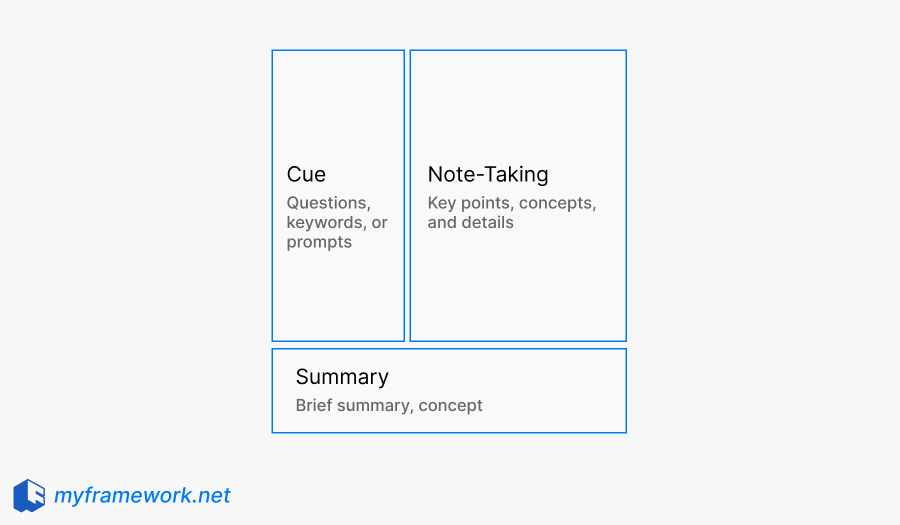
Review is a fourth move, not a fourth box: cover the notes, answer from the cues, then glance at the summary. Digital templates can keep the same regions. Handwriting is optional, not a rule of the method.
Cornell is a note layout plus a self-test. It is not a reading sequence (SQRRR) and not an explain-out-loud method (Feynman).
How it works
A useful Cornell pass is timed: capture during, process after, test later.
1. Capture in the notes area
During the session, write in the wide right region. Skip filling cues live unless the talk is slow. Mixing all three regions in real time usually produces a cramped transcript.
2. Add cues soon after
In the left column, write questions or prompts that would trigger the notes (“What three risks did she name?”). A cue that repeats a heading is weak. A cue you could use as a quiz is the point.
3. Write the summary
At the bottom, restate the page in a few sentences in your words. If you can only paste headings, you have not processed the page yet.
4. Review by testing from cues
Cover the notes. Answer from the cues. Uncover to check. Use the summary as a refresh, not as the whole study pass. Set a later review, not only the night of capture.
How it compares
| Framework | What it helps you see | How it differs from Cornell |
|---|---|---|
| SQRRR Reading Method | Survey, question, read, recite, review | How to work a text. Cornell is how to layout and test notes after capture. |
| Feynman Technique | Explain simply, find the gap, tighten | Reconstruction in speech. Cornell is a page plus cue test. |
| Outline method | Nested headings during capture | Organization without a required cover-and-test column. |
| Mind mapping | Spatial links among ideas | Different geometry. No required cue quiz. |
Cornell is the lens for a testable notes page. Other methods help when the job is reading a chapter, teaching a concept, or mapping associations.
When to Use This Framework
- A lecture or class where the stream is faster than your outline skills.
- A meeting where decisions and terms need to be quizzed before the next session.
- A reading you will convert onto a Cornell page after, then test from cues (the reading sequence itself may still be SQRRR).
Example
A concrete example makes the structure easier to reuse when you are under uncertainty.
Example: Lecture that became a reread pile
A student has twelve pages of nearly full sentences. Before the exam they reread and feel busy.
They recopy one lecture onto Cornell: notes on the right, then cues such as “When does the model fail?” and “Name the two assumptions.” Summary in four sentences. Review: cover notes, speak answers, uncover.
Implication: Weak cues show up immediately (they only restated headings). The layout did not raise a grade by itself. It made the untestable pages visible.
Example: Weekly product meeting
A PM’s meeting notes are a bullet dump. Next week nobody remembers which metric was a decision.
They use Cornell for that hour: notes capture the stream. After, cues are “What did we decide about latency?” and “Who owns the rollback?” Summary is three lines. Before the next meeting they cover notes and answer.
Implication: Action items can live in cues. The method is not a task manager. It is a page you can quiz.
Takeaway
What Cornell can help with
- Separating capture from later processing
- Building a page you can self-test
- Reducing review that is only rereading
- Adapting the three regions on paper or in a template
What Cornell cannot replace
- SQRRR. A sequence for reading a text (survey, question, read, recite, review). Cornell is how a page is laid out and tested after capture.
- Feynman Technique. Explaining in simple language to find gaps. That is reconstruction in speech, not a cue column.
- Outlining or mapping. Nested headings or spatial maps can organize. They do not require a cover-and-test cue column.
- A grade, a memory percentage, or a rule that you must handwrite.
Honest scope: Cornell structures capture and a self-test. It does not replace reading methods or teaching methods.
Frequently asked questions
Capture is similar to ordinary notes. Cue and summary need a short pass after. The bet is that later review is a test, not another reread. There is no universal time saving.
Yes. Keep three regions and a cover-and-test review. A two-column template with a summary block is enough. Handwriting is optional.
No. SQRRR is a reading sequence. Cornell is a page layout plus a cue test. You can read with SQRRR and still land the notes on a Cornell page.
That is expected. Fill cues after. Live cue-writing is optional and often worse.
No. It makes a self-test possible. Unused cues are decoration.